DEEP ANALYSIS
Technical report
Methods, measurements and limitations for a specialist audience.
Research and evidence
Own angle · Own outline · Own review
One topic. A body of work.
EvoWrite is an AI research and writing workspace. Develop your ideas in a topic space, choose an outline and direct each section. EvoWrite drafts and reviews the writing against your document intent and outline.
Build on the research. Develop new angles. Let AI handle the wording.

Inside EvoWrite
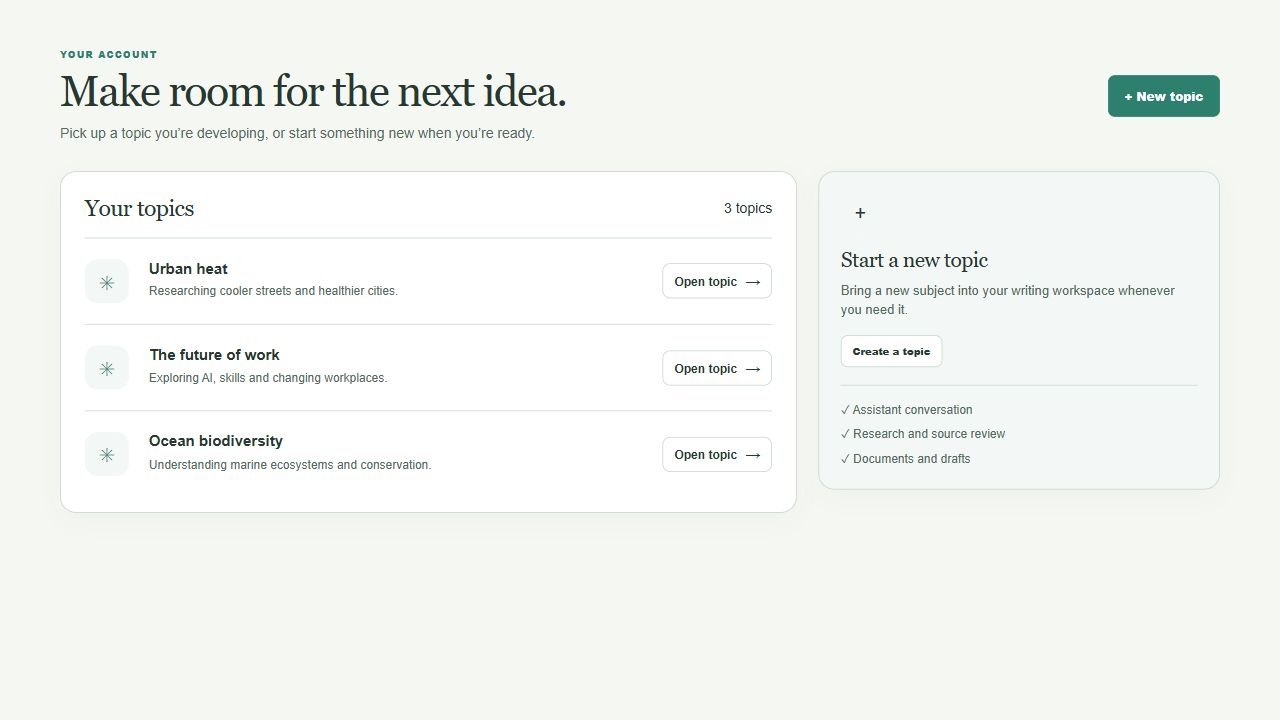
Keep topics organised, and return to their research, conversations and drafts.
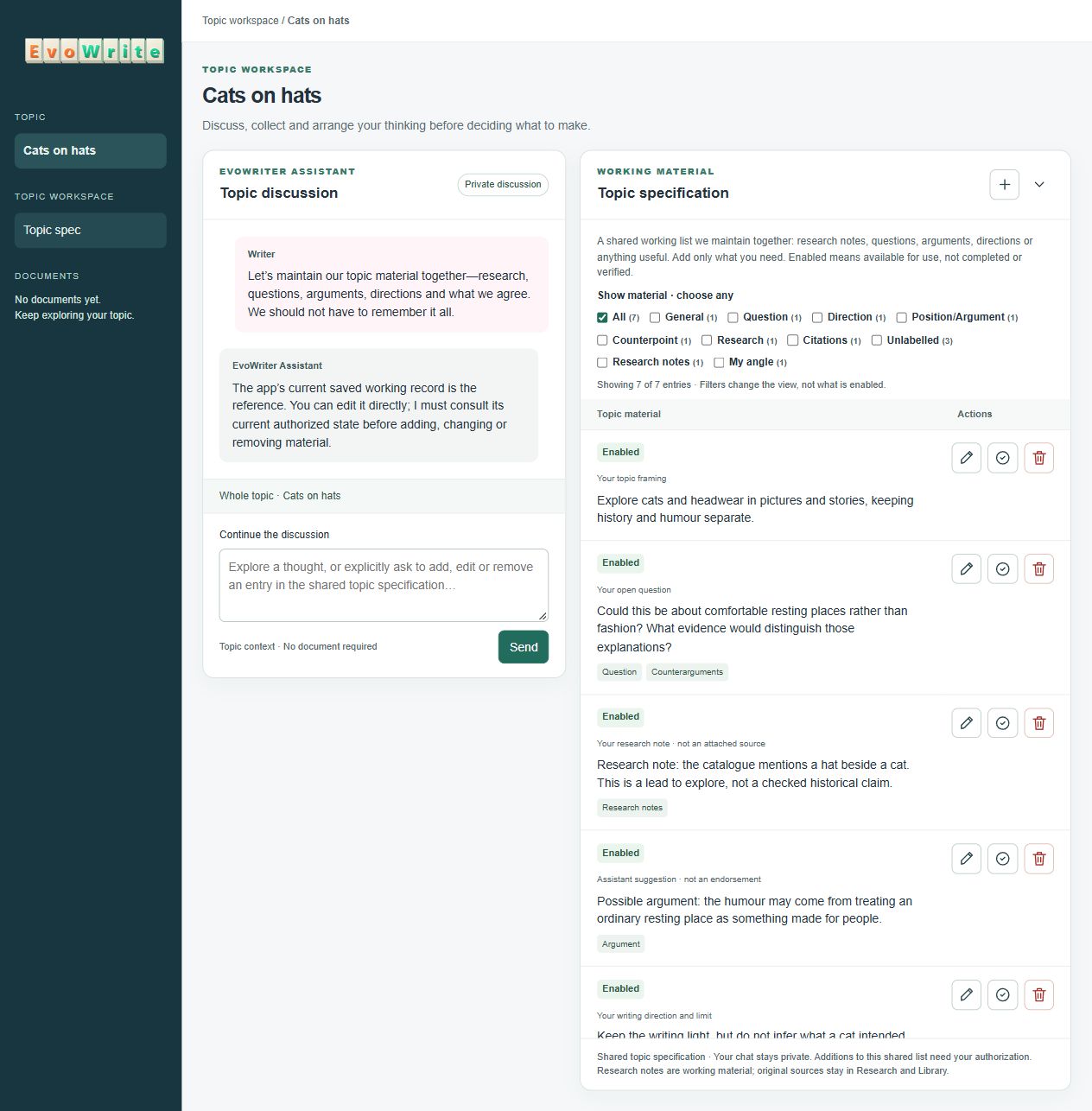
Discuss the topic, then select, add and refine research, questions, arguments and directions in one shared working list.
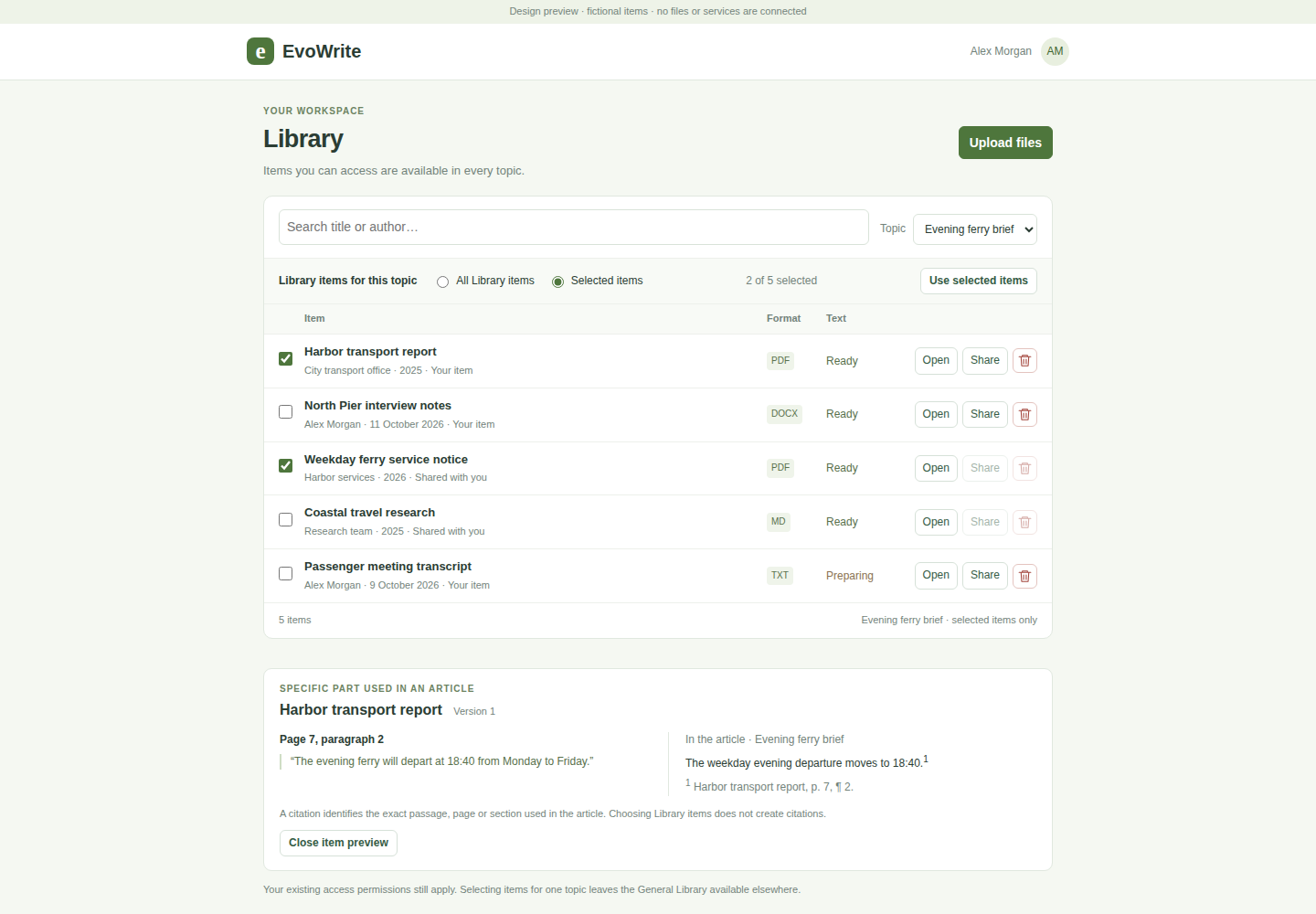

Select relevant sources and inspect the exact passages used in a work.
Select an image to inspect it at full size.
Knowledge → Topic space → Many works
Bring research, notes and discussions into one topic space. Build your understanding as the topic develops.
Create papers, reports, articles, newsletters and posts from that foundation. Each work has its own angle, audience, outline and review.
Topic space
Explore causes, compare interventions and develop the stories worth telling.
DEEP ANALYSIS
Methods, measurements and limitations for a specialist audience.
Own angle · Own outline · Own review
SCHOLARLY ARGUMENT
Develop a focused question, argument and contribution.
Own angle · Own outline · Own review
A POINT OF VIEW
Explain the findings and make a supported case for action.
Own angle · Own outline · Own review
MULTIPLE ANGLES
Tree cover, street design, housing and health—each gets its own article.
Own angle · Own outline · Own review
TIMELY UPDATE
Explain a new study or policy through the knowledge already gathered.
Own angle · Own outline · Own review
RECURRING EDITIONS
Build successive editions around fresh findings and reader questions.
Own angle · Own outline · Own review
SHORT-FORM IDEAS
Develop a sequence of findings, observations and questions for discussion.
Own angle · Own outline · Own review
MAKE IT USEFUL
Turn the findings into clear explanations, useful examples and steps readers can apply.
Own angle · Own outline · Own review
KEEP EXPLORING
Essays, opinion pieces, FAQs, teaching notes and other text formats.
Your topic · Your format · Your direction
Each work has its own audience and direction. Source-change detection and assisted updates are planned for 2027.
Product training & enablement
Build training and guidance for your teams, partners and customers from manuals, documentation, notes and memos.
Give each material its own audience, learning objectives, outline and instructions. AI drafts the content for you to refine and review.
Topic space
Selected sources, notes and discussion from your knowledge base.
Internal teams
Product briefs, demo scripts and objection handling.
Configuration guides, migration exercises and deployment playbooks.
Troubleshooting procedures and escalation guides.
Partners
Product positioning and sales guidance for resellers.
Implementation lessons, practice scenarios and reference guides for delivery partners.
Customers
Getting-started tutorials and guided exercises.
Setup, permissions and maintenance instructions.
How-to guides, FAQs and troubleshooting.
One topic space. Each outline defines its audience and teaching goals.Planned for 2027: source-change detection & assisted updates.
Discuss. Research. Cite.
Start with a question before creating a document. Combine online research with your own sources, then develop the outline and writing from that knowledge.
INVESTIGATE
Ask the Researcher to investigate a question across the public web. Bring useful findings into the topic alongside your documents and notes.
TEST THE ARGUMENT
Explore counterarguments, conflicting evidence and open questions. Keep uncertainty visible as your position develops.
KEEP THE EVIDENCE
Retain originals and source history. Reuse permitted material across topics, and choose the sources relevant to each work.
SHOW WHERE IT CAME FROM
Connect a citation to the specific passage, page or section used in the document. Inspect the source behind a statement.
Illustrative citation
The weekday evening ferry will depart at 18:40.1
1 · Harbor transport report — page 7, paragraph 2
Inspect the passage used, alongside its source version.
Same topic. Different structures.
The same research can support different stories. Choose what comes first, how much detail to include and what the reader should take away.
Start from a template, compare candidate outlines or combine parts. Refine the structure directly or with the EvoWrite Assistant.

For specialists
Precise · Analytical · Methods first
“Compare radiant heat exposure across the measured locations. State the sampling limitations.”

For decision-makers
Persuasive · Evidence-led · Options first
“Compare shade interventions. Explain the trade-offs and distinguish recommendations from established findings.”

For general readers
Conversational · Story-led · Everyday examples
“Begin with a familiar experience. Explain radiant heat in plain language. Keep the science accurate.”
A new audience can call for a new argument, order and level of detail—not simply a change of tone. Each outline remains linked to the shared topic knowledge.
Start with an outline template

Choose an included outline template for a paper, report, article or newsletter. EvoWrite adapts it to your topic, research and audience.
Adjust the outline yourself, or ask the EvoWrite Assistant to reshape it.
Choose a starting point
Select a format and audience, then apply its outline template to your topic space.
Topic: Urban heat
Template: Public-facing explainer
Make it fit the topic
The AI proposes topic-specific sections and directions using the material in your topic space. Review what it suggests and fill any gaps.
“Why shaded streets feel different” replaces a generic “Background” heading.
Keep shaping the work
Change the outline directly or discuss it with the EvoWrite Assistant. Move sections, combine ideas, change emphasis or ask for another approach.
“Lead with the walking experience. Move the measurement methods into a sidebar.”
Start from a document you already have
An uploaded document can contribute research to a topic space and provide a starting structure for new work.
Review the inferred instructions and separate reusable structure from document-specific facts before saving a template. Saved templates retain their version and source document revision.
Start from a supplied template, a document-derived template or your own outline. Each work keeps its own structure and direction while drawing on the topic’s shared knowledge.
Chat → Outline → Document
Chat: explore the topic and decide what this piece should contribute.
Outline: define the argument, evidence and direction of each section.
Document: generate and review the writing against those instructions.
The same workflow supports a long research paper or the next post in a series.
Keep the recommendation cautious. What do we still need to establish?
The evidence supports a pilot, but not wider deployment. The recommendation should preserve that distinction and specify a review of the results.
OK, do it.
Outline updated. The section instructions now reflect that direction.
Discussion uses the selected section and permitted topic knowledge.
The assessment considers whether the available evidence supports wider deployment.
A familiar experience can open a much larger question. Two streets may share the same forecast yet feel different to the people walking through them. This article explores why, using shade, surfaces and everyday observations to connect the research to the reader.
Air temperature is one part of heat exposure. Direct sunlight, surrounding surfaces and the shade available along a route also influence the experience. A useful explanation keeps these factors distinct rather than treating the forecast as a complete description.
Interpret the supplied studies within their stated conditions. Measurements from particular streets and times do not describe every neighbourhood. Keep the limitations alongside the findings and identify where further evidence is needed.
A limited pilot would allow the team to assess reliability under operating conditions. Wider deployment should follow a review of the pilot findings; the available evidence does not yet establish reliability at scale.
A shaded route can change the experience of a hot day. Trees, canopies and the arrangement of buildings influence where sunlight reaches the pavement. The benefits depend on the location and time of day, so the details of each street matter.
The next step is to define the pilot conditions and the evidence required for that review.
On your next walk, notice where shade begins and ends. Look at the surfaces around you and the places where people stop to rest. Those observations can help frame better questions about how a neighbourhood responds to heat.
Start with a template
Keep the reviewed outline, section directions and reusable wording. Supply the variables, files and data needed for this document.
Each new proposal gets its own inputs and document. Adjust the outline directly or with the EvoWrite Assistant before drafting.
Section directions and review criteria carry forward. Each new proposal gets its own inputs and document.
Then revise and review
Update the section instructions, inspect the affected passages and review the result against the revised brief. This example changes the recommendation from full deployment to a limited pilot.
Recommend a limited pilot instead of full deployment. Require an evidence review before expansion. Preserve the methods section.
Proceed with full deployment across all sites.
Begin with a limited pilot. Decide on wider deployment after reviewing the evidence.
The summary must reflect the revised decision.The available findings support an organisation-wide rollout.
The findings support a limited trial; they do not establish reliability across all sites.
Retains the evidence limitation specified in the brief.Schedule implementation at all sites.
Define pilot conditions and success criteria. Review the findings before deciding whether to expand.
Replaces rollout instructions with the required review.The assessment compares observed performance under the documented test conditions.
This passage remains unchanged in both versions.Specify. Revise. Review.

Keep the brief, evidence and document connected through successive drafts. Inspect proposed changes and their reasons, then review the resulting work for missed requirements and inconsistencies.
Define each section, including the sources to use, exact wording to retain and claims to avoid. Set the audience and purpose for the whole document.
Identify passages that may need revision. Inspect their proposed changes and reasons while preserving material outside the chosen scope.
Review sections and the complete document against the brief. Keep missed requirements, unsupported additions and uncertain findings visible for expert judgement.
“Recommend a pilot, rather than full deployment.”
Revisit the recommendation, executive summary and next steps. Check that none still presents full deployment as the decision.
Specification → output
A passage can draw on several section instructions and document-wide requirements. One requirement can also shape several passages. Inspect those relationships when reviewing the work or changing its direction.
Recorded links show what informed the text. Review separately assesses whether the text satisfies those requirements.
Select a requirement to highlight every linked passage.
Select a passage to inspect the inputs behind it.
Inspection highlights are author controls; they do not appear in the reader’s document.
Recorded inputs
Notice period included. Delivery date remains missing; the deadline cannot yet be established.
A shared research foundation
Keep sources and working knowledge together. Choose the material each topic draws on.
A detailed assessment and a plain-language briefing can draw on the same research without sharing the same outline.
Planned connections
Connections are planned for the tools where your documents, research and working information already live.
EvoWrite beta
Develop a topic, choose an outline and tell EvoWrite what each section should say. It drafts the document, then reviews the result against your document intent and outline, flagging gaps and inconsistencies for your attention.
In development. Join the beta waiting list.
Business enquiries
Ask about local deployment, reseller and service partnerships, customisation, or EvoWrite for your organisation.